
Importing wrestlers from a spreadsheet can save time when setting up a dual team tournament. Before importing, make sure your teams and weight classes have already been created in the event and that your spreadsheet matches the required format. Follow the steps below to prepare your file and complete the import. Watch the video below to see the process in action.
Prepare Your Spreadsheet
Your spreadsheet must meet the following requirements:
- One wrestler per row
- One weight class column
- One first name column
- One last name column
- One team column
- One grade column
- One wins column
- One losses column
- One extra field column
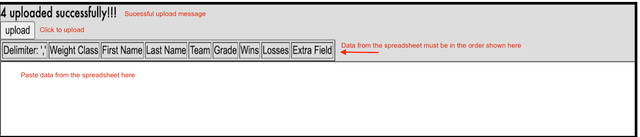
- A delimiter column containing a comma (,) between each data field
If you are not using every field, leave the column blank but do not remove it.
Your team names and weight classes must already exist in the tournament and must match the spreadsheet.
Import the Spreadsheet
- Log in to your tournament as an administrator.
- Go to Setup > Wrestlers > More > Upload Wrestlers.
- Copy the spreadsheet data without the column headers.
- Paste the data into the upload text box.
- Verify the layout matches the format shown on the upload page.
- Click Upload.
- Review the confirmation message.
- Go to Registration > Wrestlers to verify the wrestlers were imported correctly.
Related Resources
Need to import wrestlers into a different tournament type? See Import a Spreadsheet of Wrestlers into an Open Tournament & Import a Spreadsheet of Wrestlers into a Predefined Tournament.