
To access brackets for the tournament:
1. Once inside the tournament, look to the left of the tournament information, and you will see the Event Hub.
2. Click on Brackets.
3. Click the red Select Brackets button.
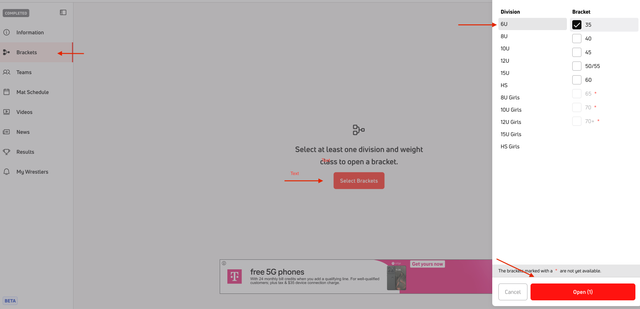
4. A panel will open on the right that will show the weight classes. Brackets that are grayed out and have a red * are not available yet.
5. If there are multiple divisions in the tournament, click on the division to see the brackets for that division.
6. Check the weight classes you would like to view. Click the red Open button.
7. Your selected bracket will open on the next page. If you selected multiple brackets, the first bracket will open, and the others will show as tabs at the top of the bracket page.
For other helpful articles, please refer back to our Help Center.