
When you're following specific athletes at a busy tournament, you shouldn't have to search for them every time you want an update. My Wrestlers gives you a personalized list inside the event, making it easier to check the wrestlers you care about, jump to their brackets, view athlete information, and manage available notifications.
1. Open the wrestling event on FloWrestling.
2. Select My Wrestlers from the Event Hub.
3. Select Add Wrestler at the bottom or upper-right corner of the page.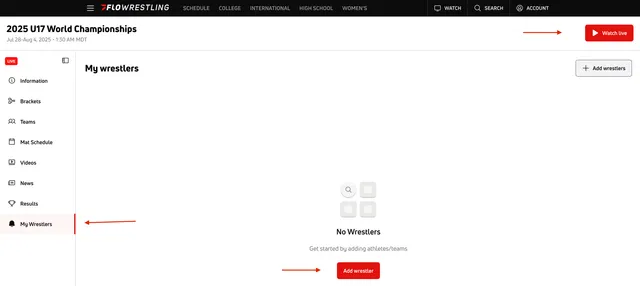
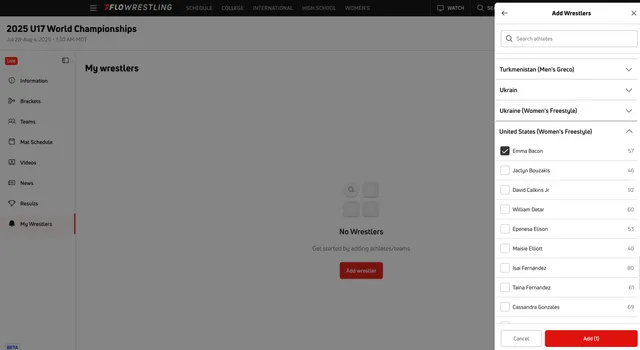
4. A panel with the teams participating in the event will open.
5. Select the arrow next to a team to view its wrestlers.
6. Check the box next to each wrestler you want to follow.
7. Select Add.
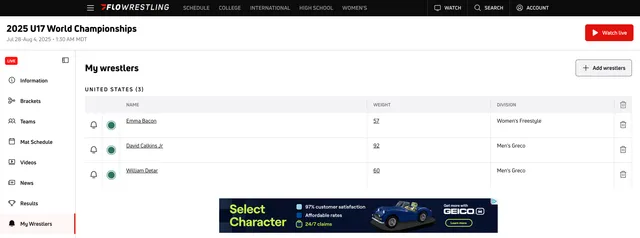
Now you will see a list of the wrestlers you are following. From here, you can:
Manage My Wrestlers
From My Wrestlers, you can use the available options to:
- Select the Bell icon to manage alerts.
- Select a wrestler's name to view their athlete summary.
- Select their weight class to open the bracket.
- Select the Trash Can icon to remove the wrestler from My Wrestlers.
Tip
You can select multiple wrestlers before choosing Add, making it easier to build your list when you're following several athletes from the same event.
For other helpful articles, please refer back to our Help Center.